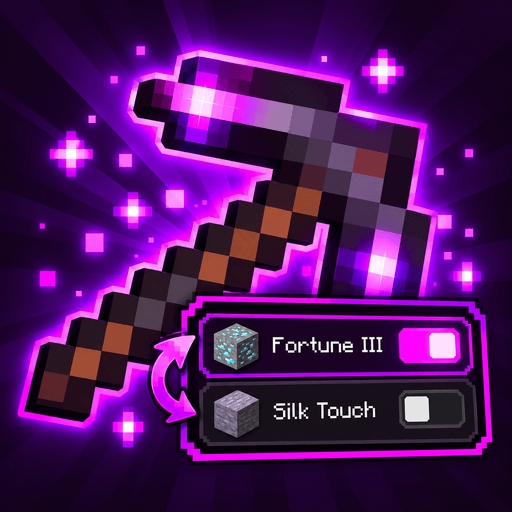
How it works
Vanilla won't put some enchantments on the same item: Fortune and Silk Touch, the four Protections, Sharpness, Smite and Bane of Arthropods, Depth Strider and Frost Walker, Multishot and Piercing, Riptide and Loyalty or Channeling, Infinity and Mending. Adjustability lets an item hold them anyway, with only one side of each conflict active.
First time
When an item with a dormant enchantment enters your inventory, a book-icon reminder explains how to open the Adjust panel. It stays until you open a panel: hover the item and press Left Alt, or your rebound Adjust key. After your first successful panel switch, a second reminder suggests binding Cycle in Controls to switch while mining.
Slots holding dormant or switched-off enchantments have a small magenta corner. Turn it off with slot_marker, or change slot_marker_color, under [hints] in your player settings.
Progress is saved on your client across worlds and servers. /adjustability tutorial starts both steps again; tutorial = "DONE" under [hints] in the player settings turns them off.
Active and dormant
- Active enchantments work exactly like vanilla ones. Vanilla and every other mod see only these.
- Dormant enchantments are kept on the item with their level, shown in its tooltip, and do nothing until you make them active.
An item never has two conflicting enchantments active. Fortune III and Silk Touch on one pickaxe means it mines with one of them, never both.
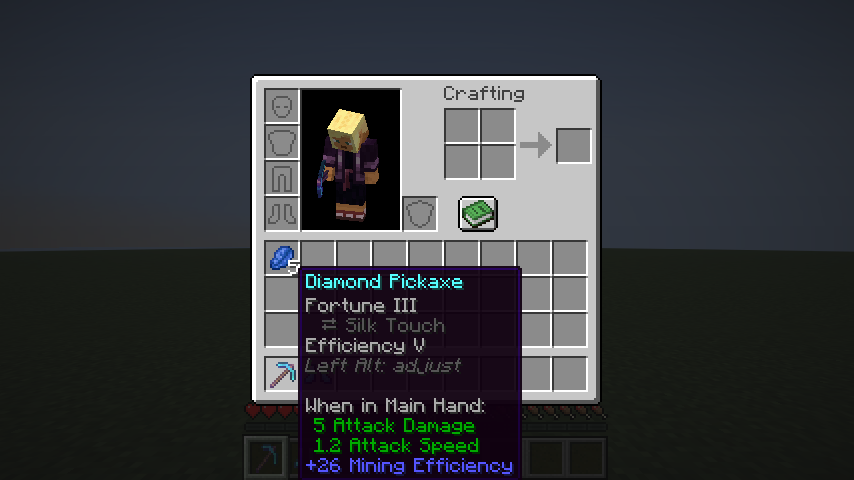
Dormant enchantments are listed in dark gray with ⇄, each right under the active enchantment it conflicts with (Silk Touch under Fortune), followed by a reminder of the key that opens the Adjust panel. One with nothing active to conflict with (possible when the server allows none) comes after the last active one.
Getting conflicting enchantments on an item
Use an anvil, like any other enchantment:
| Left | Right | Result |
|---|---|---|
| Pickaxe with Fortune | Book with Silk Touch | Fortune stays active, Silk Touch is added dormant |
| Pickaxe with Fortune | Pickaxe with Silk Touch | Same |
| Book with Fortune | Book with Silk Touch | One book with both; putting it on a pickaxe splits them into active and dormant |
The anvil costs what vanilla charges, plus a little extra per level of each enchantment that becomes dormant (set by the server). Enchantments that don't conflict with anything are added active, like vanilla. What was active on the left item stays active; the new conflicting enchantment is the one that becomes dormant. If nothing was active yet (a plain item and a book holding both), the enchantment whose id comes first alphabetically is active.
The anvil gives no result if the item would hold more dormant enchantments than the server allows, or if the price goes over the survival limit of 39 levels.
Switching
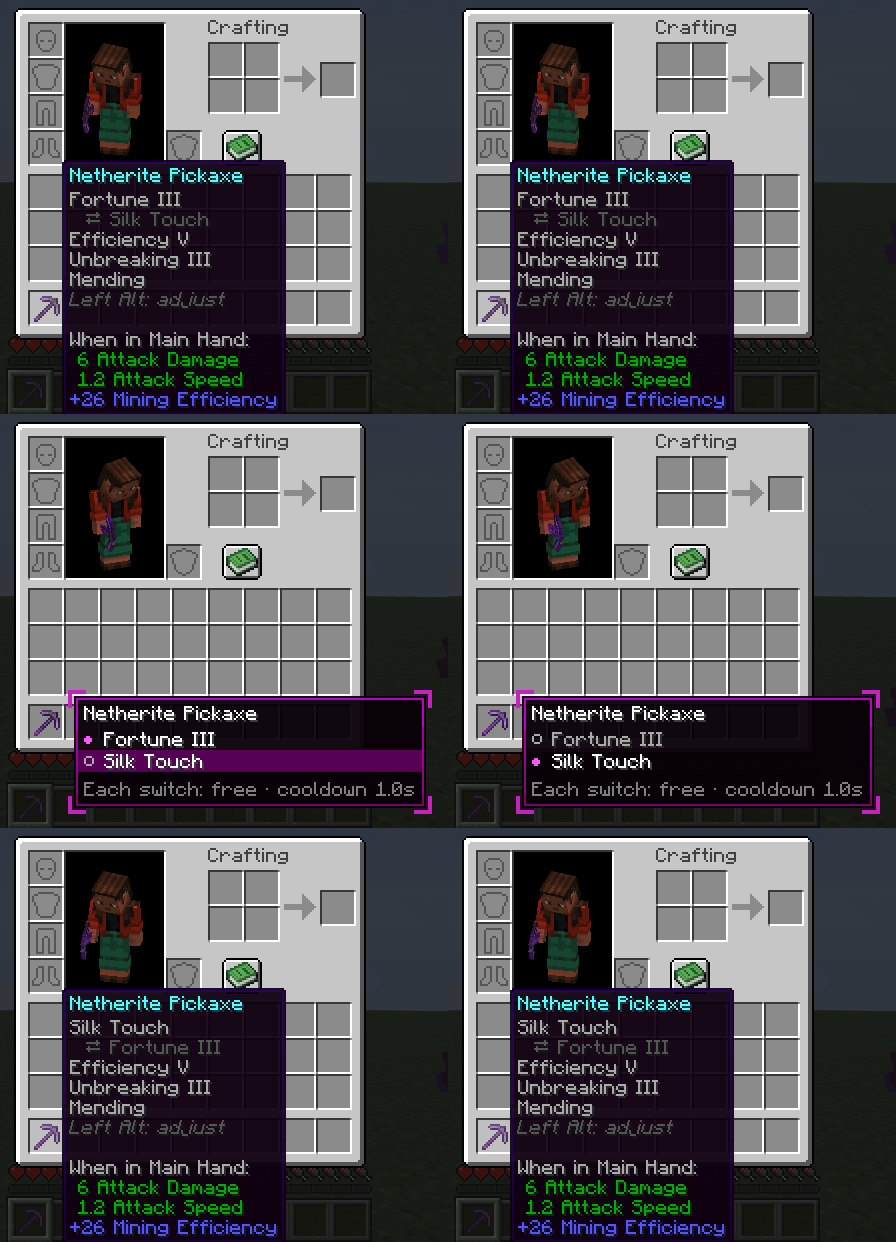
- In your inventory (or any chest, shulker box...): hover the item and press Left Alt. The Adjust panel opens next to it, like a tooltip that stays: each group of conflicting enchantments, the active one marked ●, the dormant ones ○. Click a dormant one to make it active. Left Alt again, Escape or a click outside closes it; that click never picks up an item. Prefer holding the key?
/adjustability panel activation hold: the panel is open while you hold Left Alt (click while holding), and closes when you let go. The item's tooltip shows the key as a reminder (Left Alt: switch enchantments). Its colors, side and decorations are yours to change:/adjustability panel, or the player settings. - While playing: bind Cycle held item's enchantments under Controls → Adjustability (unbound by default). One press steps the held item to its next choice, e.g. Fortune → Silk Touch → Fortune, and says which one is active above the hotbar. Items with more than one group of conflicts (boots: the Protections, and Depth Strider / Frost Walker): Sneak + Cycle picks which group the key steps.
- By command:
/adjustability toggle minecraft:silk_touchon the held item.
Switching has a cooldown (1 second by default) and can cost XP, an item or durability; the server decides. Creative players switch for free and without a cooldown. A curse is never switched off.
Switching an enchantment off
An enchantment that conflicts with nothing on the item can be switched off and back on: Knockback on a sword you use to herd animals, Fire Aspect that would burn the drops, Frost Walker near water, Silk Touch on a pickaxe without Fortune when you want cobblestone. The Adjust panel opens on any enchanted item for this, and lists these enchantments under Other enchantments after the groups, one on/off row each; click the heading to fold the section (singles in the player settings sets how it starts). The tooltip shows a switched-off one as Unbreaking III (off), and /adjustability toggle switches it either way.
A switched-off enchantment stays off through anvils and repairs until you switch it on; it costs the same as any switch and never counts toward max_dormant_per_item. Curses can't be switched off. Servers can turn this off with allow_switch_off. The Cycle key leaves these alone and only steps through groups of conflicting enchantments.
None
Some servers also allow none (allow_none): the panel then has a None row for each group, and choosing it leaves every enchantment of that group dormant, e.g. a pickaxe mining with neither Fortune nor Silk Touch. The Cycle key goes Fortune → Silk Touch → none → Fortune.
Switching while breaking a block is fine: the drops come from what's active when the block breaks, so it never counts both. An item that somehow has two conflicting enchantments active (from /give or another mod) is fixed the first time you switch it or use it in an anvil; nothing is lost, the extra one becomes dormant.
In the creative inventory the Adjust key works on your own items: the hotbar, and every slot on the inventory tab. Some combinations bring more than one enchantment back: on a trident, switching from Riptide to Loyalty also makes Channeling active again, because Loyalty and Channeling don't conflict with each other.
Each switch plays a short enchanting sound (adjustability:item.switch) that you and players nearby hear; servers can turn it off (play_sound), resource packs can replace it.
Advancements
Adjustability has its own advancement tab:
| Advancement | How |
|---|---|
| Adjustability | Have an item with a dormant enchantment in your inventory |
| Change of Plans | Switch which enchantment is active |
| Best of Both | Switch a tool that holds both Fortune and Silk Touch |
| Every Angle Covered (goal) | Switch a piece of armor that holds all four Protections |
| Indecisive (challenge) | Switch 100 times |
| Neither (hidden) | Leave a group with none of its enchantments active (servers with allow_none) |
Your switches are counted under Statistics → General → Enchantment Switches.
Grindstones
A grindstone removes dormant enchantments too, and gives experience for them like for active ones. Curses stay, like vanilla. Servers can keep dormant enchantments instead (remove_dormant in the server config).
If the mod is removed
Items keep their active enchantments and keep working; the dormant ones stay in the item's data, inert and invisible, and come back if the mod does. See Uninstalling for /adjustability flatten, and Where dormant enchantments are stored for the exact format.